Understand CMS access
Learn how organization-level CMS access and permissions for each site work together.
CMS access has two layers for a member with the User system role: organization access levels configured for that member in My, and site access levels configured separately for each CMS site in App. Your organization must also have CMS available through its active subscription. An access-level profile can supply organization access levels, but it does not grant access to every site.
For the broader distinction between subscriptions, licenses, roles, and permissions, read Understand your access.
Check organization access levels in My
An organization administrator can open Users in My, select your user, and choose Edit. Under Access Levels, the CMS selection must be Access. It can be assigned directly or through an access-level profile. The available categories depend on the organization's active subscription.
We call these per-member settings organization access levels throughout these guides. CMS: No access here means that this User cannot use any CMS site in the organization, even if they have a site assignment. CMS: Access enables the CMS access layer, but the User still needs site access levels for the sites they work on.

Illustrative example of the organization-level CMS permission in the user detail editor.
Permissions are set for each site
Each site's Access & Roles settings assign three independent categories:
| Category | Available levels | What it covers |
|---|---|---|
| CMS Content | No access, Viewer, Editor, Manager | Content work on the selected site. |
| CMS Site Settings | No access, Manager | Configuration and access management for the selected site. |
| CMS Inbox | No access, Viewer, Agent, Manager | Submissions for the selected site. |
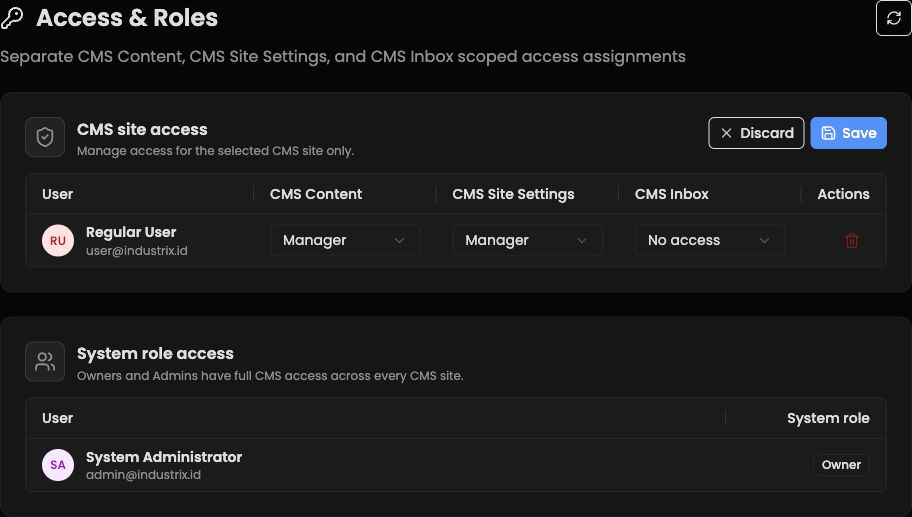
Illustrative example: site access is assigned separately for CMS Content, CMS Site Settings, and CMS Inbox. Select the intended site before reviewing its assignments.
No access in one category does not cancel a level in another. A CMS Content Editor is not automatically a CMS Site Settings Manager, and CMS Inbox access is separate from both. Choose the levels needed for the person's work; leave unrelated categories at No access.
For example, someone can have CMS Content Editor on Site A, Viewer on Site B, and No access to either site's inbox. The site selection determines which assignment applies. Organization-level CMS Access alone does not turn those site assignments into access to all sites.
Owners and Admins inherit CMS access to all active CMS sites in the organization. They appear separately under System role access rather than needing an individual site assignment. Reserve the Admin system role for a person the Owner deeply trusts with broad organization control; use the User role and site-specific levels for most teammates. Choose roles and access levels explains that choice.
If you cannot open a site or perform an action
- Confirm that you are in the intended organization and have selected the intended CMS site.
- Ask your organization administrator to check that CMS is included in the organization's active subscription and that your organization access levels in My have CMS: Access.
- Ask the person who manages that site's Access & Roles to review your CMS Content, CMS Site Settings, and CMS Inbox levels for the selected site.
A site assignment cannot restore access when the User’s organization access levels in My have CMS: No access. Likewise, CMS Access at the organization level does not give a User permission to work on an unassigned site.
If both access layers are correct but the site is still missing or CMS remains unavailable, contact Industrix support.